Copy Telegram Signals to MetaTrader 5 Instantly
TeleMT5 automatically copies trades from Telegram channels to MetaTrader 5 without manual intervention. Advanced risk management, smart trading filters, and multi-channel support.
Professional Automated Trading
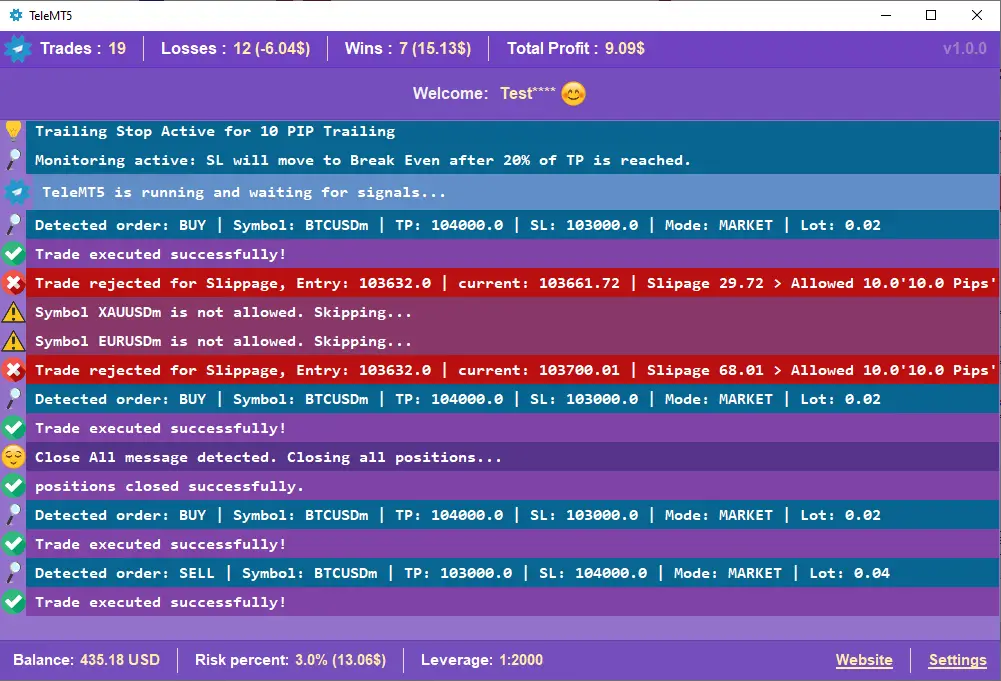
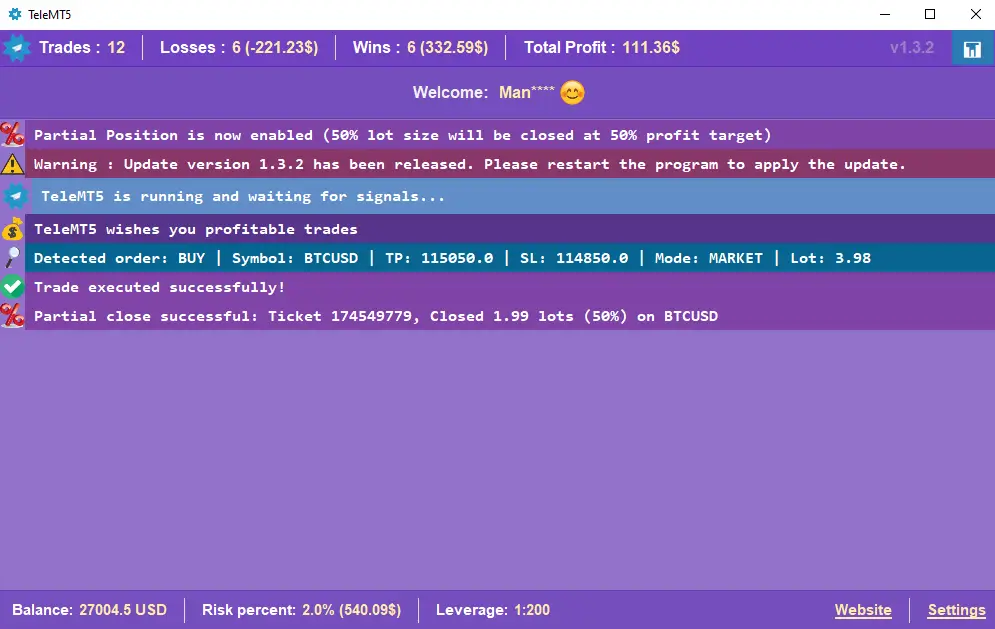
TeleMT5 bridges Telegram trade signals with MetaTrader 5 execution. The program displays all critical statistics including executed trades, winning trades, losing trades, and total profit/loss.
Analyze Any Telegram Channel Before You Trust It
Don't trade blind. Point TeleMT5 at any signal channel and get a full performance report — win rate, profit factor, edited messages, and a clear verdict on whether the channel is worth following.
Full Channel Intelligence — At a Glance
- Total Trades & Messages
Counts every signal and non-trade message posted over your selected date range.
- Wins vs Losses
Exact numbers and percentages — see the channel's real win rate, not what they advertise.
- Edited Messages Detected
Flags any signal that was silently changed after posting — a key indicator of manipulation.
- Custom Date Range
Analyze the last week, month, quarter, or any custom period you define.
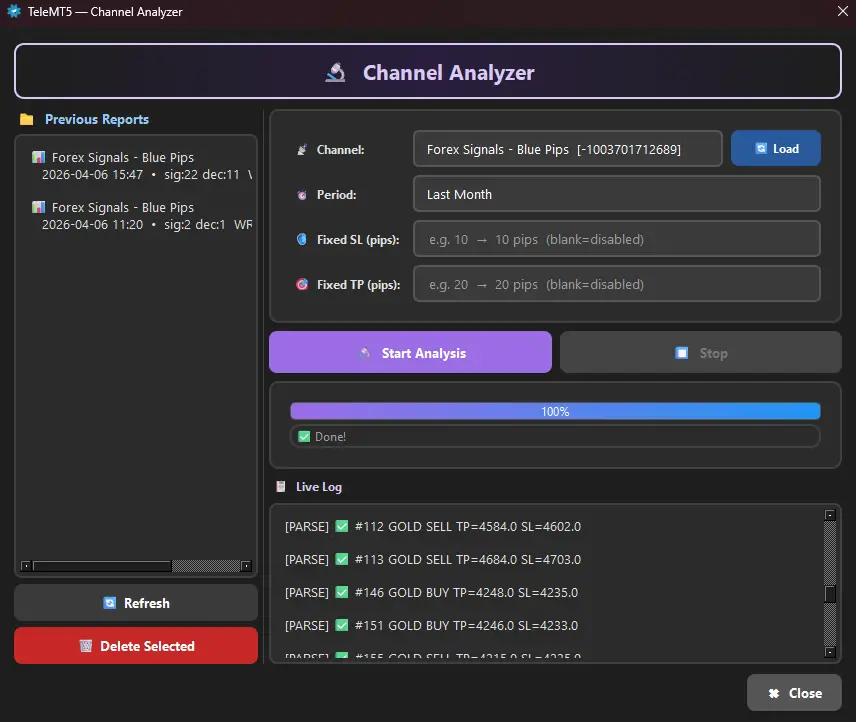
Channel overview dashboard — trade summary and performance breakdown
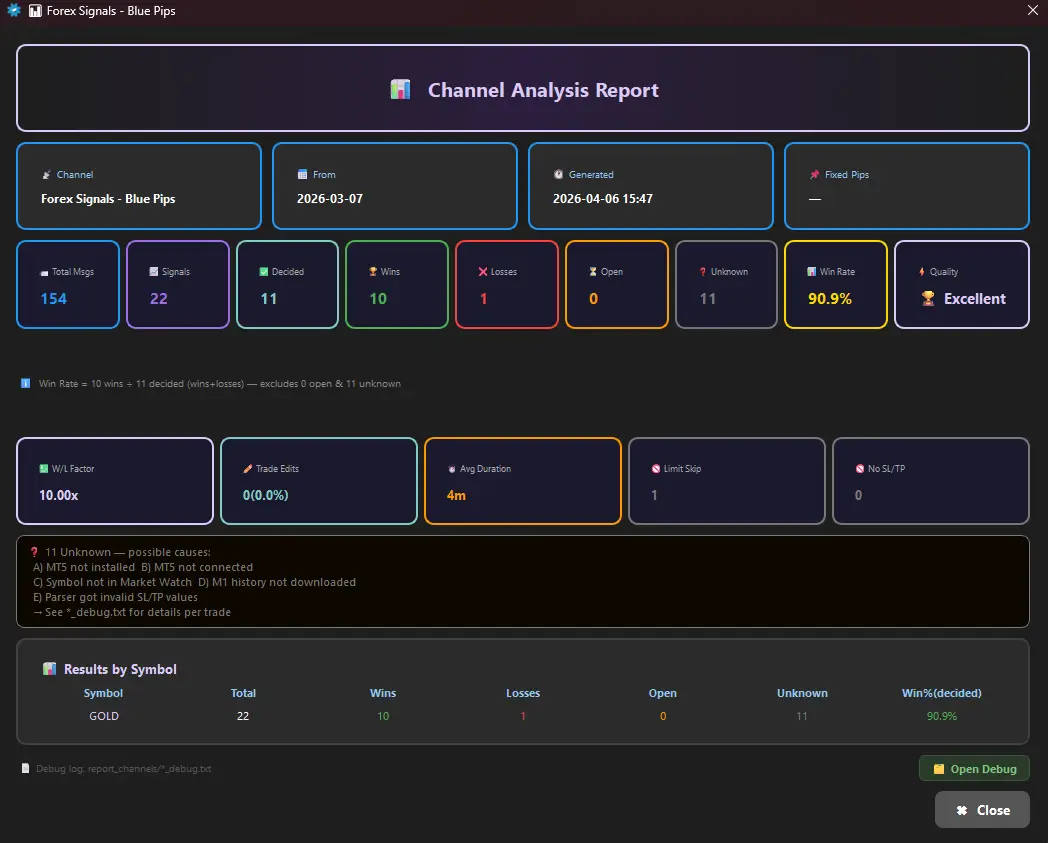
Full report — detailed trade-by-trade breakdown and verdict
Comprehensive Report — Every Metric That Matters
At the top of every report, TeleMT5 gives you a clear recommendation — Excellent, Good, or Poor — based on win rate, edit frequency, and overall performance data.
Everything You Need for Smart Trading
From multi-channel support to advanced trading filters — TeleMT5 covers every aspect of automated signal copying.
Multiple Channel Support
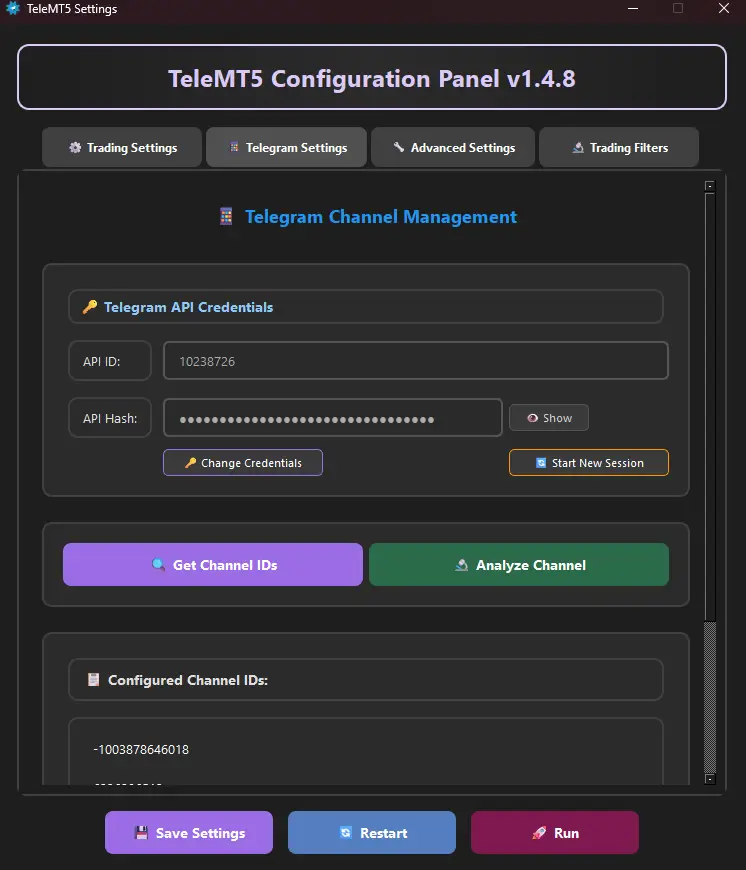
Connect to multiple Telegram channels simultaneously. Supports both English and Arabic trade signals with flexibility to add more languages.
Instant Execution
Trades are executed instantly upon signal detection, minimizing slippage and maximizing profit potential through lightning-fast order placement.
Risk Management
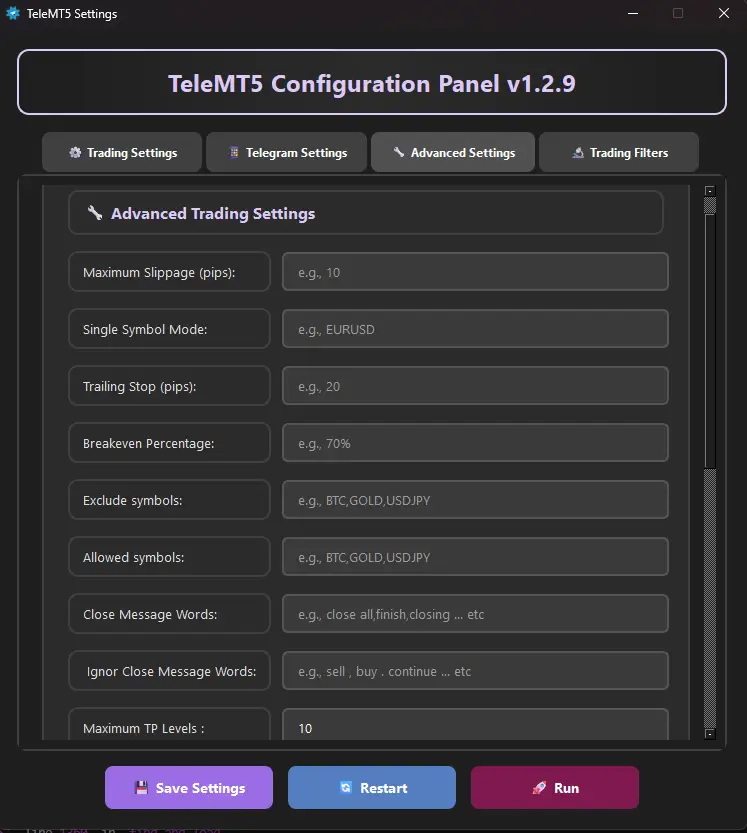
Fixed lot size, risk percentage calculation, safe lot backup, and slippage protection — comprehensive tools to protect your capital.
Trailing Stop System
After the price moves in profit direction by your specified pips, the stop loss starts moving automatically, securing the trade and preserving profits.
Breakeven Protection
When trade reaches your target percentage (e.g. 70%), the stop loss moves to entry point automatically, securing the trade from loss.
Smart Trading Filters
SMA 200 trend filter, ADX strength, RSI momentum, ATR volatility, multi-timeframe confirmation, and breakout detection.
Partial Position
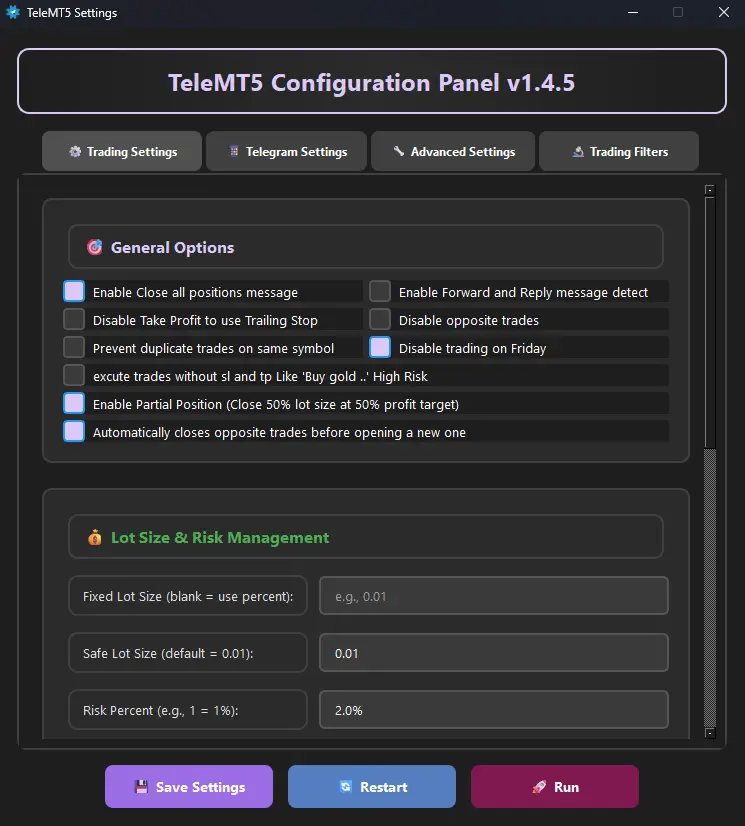
Automatically close 50% of position when 50% of take profit target is reached, securing profits while letting the rest run.
Multi TP Levels
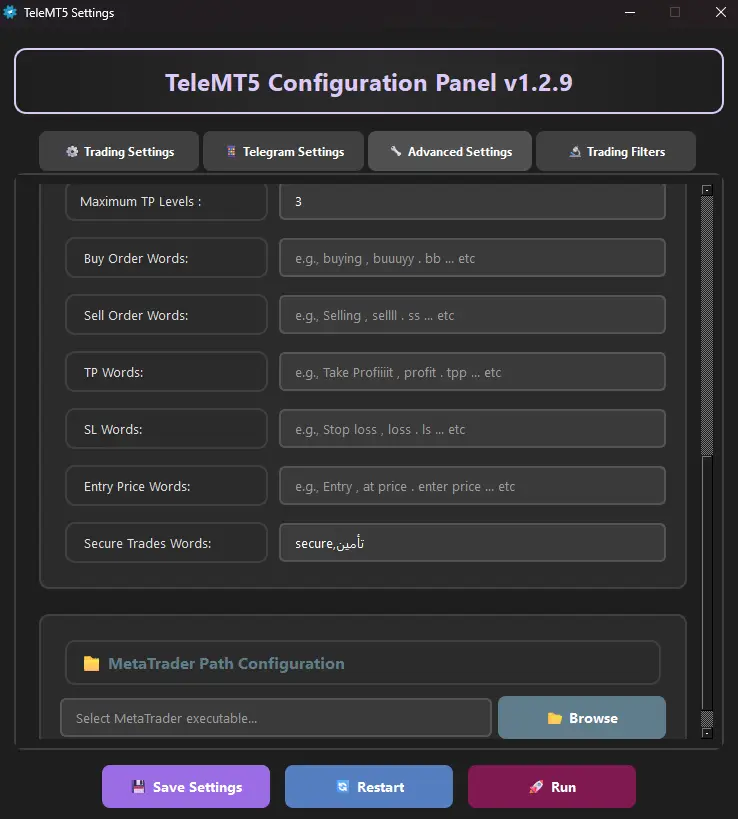
Control how many take profit levels to execute. Set to 1, 2, 3, or leave empty for default first TP only.
Market Analysis
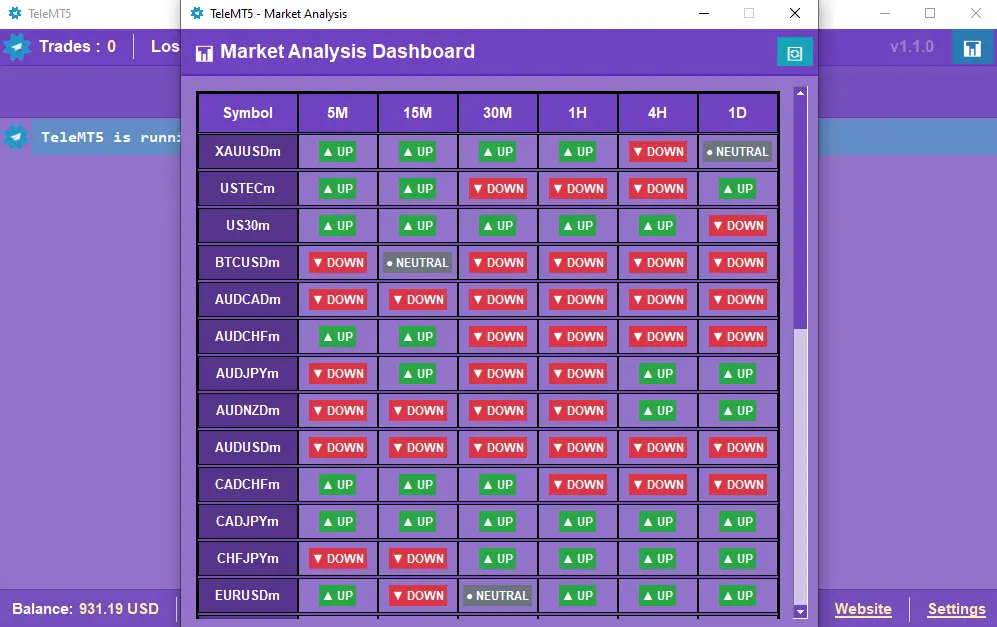
Built-in smart analysis shows market direction for each currency across multiple timeframes with high-accuracy algorithms.
Complete Control Over Every Trade
💰 Trade Size & Risk Management
| Setting | Description | Example |
|---|---|---|
| Fixed Lot Size | Execute all trades with a predetermined lot size | 0.01, 0.1, 1.0 |
| Risk Percentage | Calculate lot size based on account risk percentage | 1% of $500=$5 max loss |
| Safe Lot | Backup lot size used when calculations fail | 0.01 (minimum safe) |
⏱️ Slippage Protection
When enabled, the program compares the entry price from the Telegram message with current market price. If the difference exceeds your specified threshold (e.g., 10 pips), the trade is rejected to protect against unfavorable market movements.
🔁 Single Symbol Mode
🛠️ MetaTrader Path Selection
If you have multiple MT5 installations, specify which terminal the program should connect to by selecting the appropriate terminal64.exe file path.
📉 Stop Loss & Take Profit Adjustments
Loss Adjust
- +10: Move stop 10 pips away (wider)
- -15: Move stop 15 pips closer (tighter)
- Empty: Use original stop loss
Profit Adjust
- +10: Move TP 10 pips away (higher target)
- -10: Move TP 10 pips closer (quicker)
- Empty: Use original take profit
Advanced Position & Risk Controls
| Feature | Description | Benefit |
|---|---|---|
| Close All Positions | Respond to close signals from channel | Follow channel exit strategies |
| Close Message Words | Keywords that trigger position closure | Customize: "close, exit" |
| Ignore Close Words | Words in close messages to ignore | Fine-grained control |
| Prevent Opposite Trades | Block conflicting positions on same symbol | Avoid hedge conflicts |
| Prevent Duplicate Trades | One position per symbol maximum | Prevent overexposure |
| Disable Trading on Friday | Prevent Friday trade executions | Avoid weekend gap risks |
| Disable TP for Trailing Stop | No fixed profit target, trailing stop closes | Ride strong trends |
| Execute Without SL/TP | Execute trades even without stop loss or take profit | ⚠️ Use with caution |
| Auto Close Opposite Trades | Closes opposite positions before executing new trades | Ensures clean trade reversal and avoids hedging conflicts |
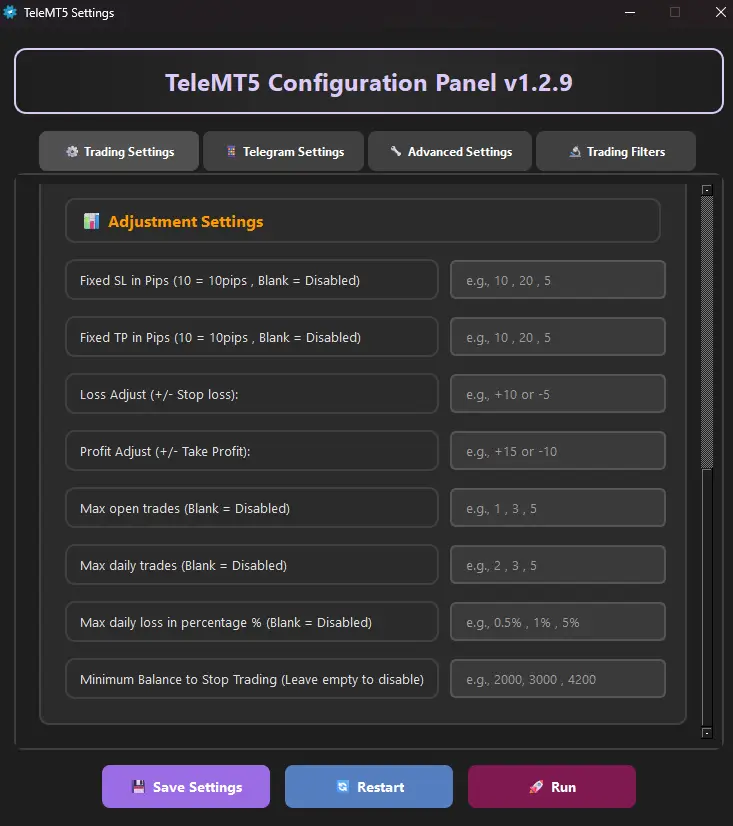
Fixed Stop Loss (Pips)
Leave blank to disable. Enter a pip value and TeleMT5 will automatically apply this stop loss to every trade.
Fixed Take Profit (Pips)
Leave blank to disable. Enter a pip value to place take profit at the specified distance for every trade.
Max Open Trades
Set the maximum number of trades open at the same time. Leave blank to remove the limit.
Max Daily Trades
Set maximum trades per day. Leave blank to disable this limit.
Max Daily Loss %
Limit daily loss to a percentage of account balance (e.g. 0.5%, 1%, 5%). TeleMT5 stops trading if losses reach this percentage.
Minimum Balance Stop
Specify the minimum account balance at which trading stops (e.g. $2000, $3000). TeleMT5 halts when balance drops below.
Secure Trades Words
Define keywords (e.g. "secure, breakeven, lock") that trigger breakeven protection — moving SL to entry price for all open trades.
Partial Position
When enabled, TeleMT5 closes 50% of position once 50% of take profit target is reached, securing profits automatically.
Smart Signal Filtering
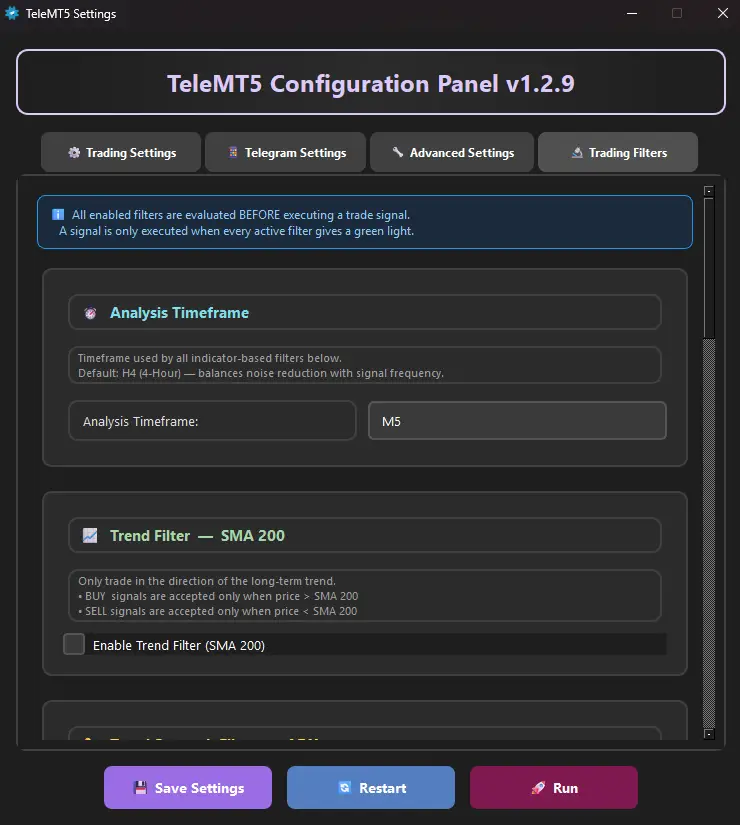
Advanced technical indicator filters to validate signals before execution. Select your analysis timeframe (default H4) for all filters below.
Trend Filter (SMA 200)
Only trade in the direction of the long-term trend. BUY signals accepted when price is above SMA 200, SELL signals when below.
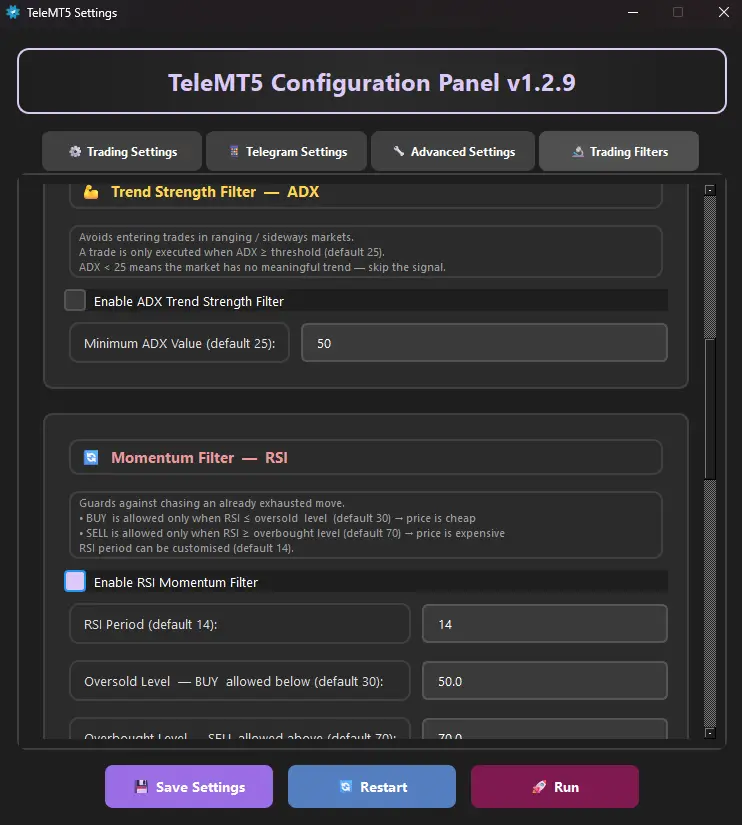
Trend Strength (ADX)
Avoid ranging markets. Trades only execute when ADX ≥ your threshold (default 25). Below 25 indicates weak trend — signal is skipped.
Momentum Filter (RSI)
Avoid exhausted moves. BUY accepted when RSI ≤ oversold (default 30), SELL when RSI ≥ overbought (default 70). Customizable period and levels.
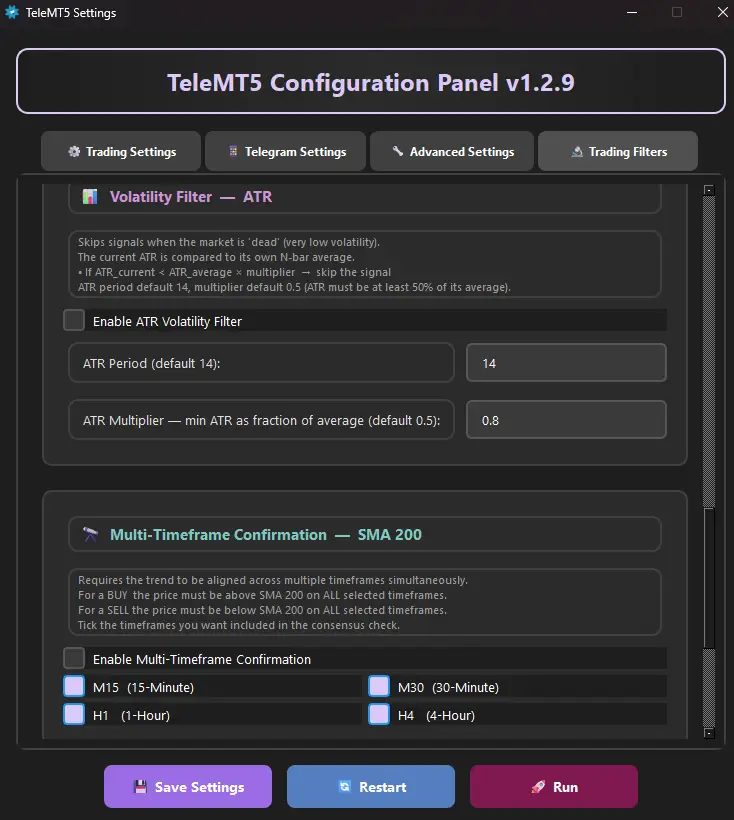
Volatility Filter (ATR)
Skip signals when market is too quiet. Current ATR must exceed average × multiplier (default 0.5=50% of average volatility).
Multi-Timeframe Confirmation
Require trend alignment across M15, M30, H1, H4 simultaneously. BUY needs price above SMA 200 on ALL selected timeframes.
Breakout Confirmation
Confirm price has broken a key level. BUY requires close above highest high of last N bars (default 20). SELL requires close below lowest low.
Signal Recognition & Keywords
Adapt TeleMT5 to recognize signals in any language and format.
| Word Type | Purpose | Example |
|---|---|---|
| Buy Order Words | Custom buy terms in any language | "buy, شراء, long, call" |
| Sell Order Words | Custom sell terms in any language | "sell, بيع, short, put" |
| TP Words | Take profit indicators | "tp, target, profit, هدف" |
| SL Words | Stop loss indicators | "sl, stop, loss, وقف" |
| Entry Price Words | Entry price indicators | "entry, enter, price, سعر" |
Forward & Reply Support
Enable if channel publishes trades through forwarded messages or replies to old messages. Disable for direct messages to avoid processing delays.
Symbol Filters
Exclude symbols: Block specific pairs. Allowed symbols: Trade only specified pairs. Full control over which instruments to use.
Watch TeleMT5 in Action
See how easy it is to set up and start copying trades automatically.
Program Screenshots
Get Started in Minutes
Frequently Asked Questions
Elevate Your Trading with Automated Signal Copying
The Premier Telegram to MT5 Bridge
As a leading Telegram signal copier, TeleMT5 perfectly bridges Telegram channels and MetaTrader 5's execution capabilities. Stop missing opportunities due to manual entry delays.
True Forex Signal Automation
Achieve genuine forex signal automation. Our software intelligently parses signals in multiple languages and formats, enabling a disciplined, hands-free trading strategy operating 24/5.
Your Smart Trading Assistant
More than an MT5 trading bot — TeleMT5 combines algorithmic speed with human expertise from your chosen signal providers. Full control with external, human-led signals.
Get Your TeleMT5 Lifetime License
One-time payment. No subscriptions. Unlimited future updates.
- ✅ Full access to all current & future features
- ✅ Lifetime software updates
- ✅ Premium customer support
- ✅ License for one MT5 account
Click the button to create a new purchase order.
Get in Touch
Have questions? We're here to help. Reach out to our support team anytime.